When an official developer, publisher, or distributor does not provide a torrent, there may be no authoritative reference against which a third-party .torrent file or magnet link can be verified. BitTorrent hashes can confirm that downloaded data matches a particular set of torrent metadata. They cannot establish who created the torrent, whether the uploader had permission to distribute it, or whether the included files are safe to run. The safest option is to obtain the content through an official download page, authorized mirror, software repository, or distributor. When that is not possible, the following checks can help identify inconsistencies, but they cannot turn an unverified torrent into an official release.
How to Check the Infohash Code to Verify the Original Torrent File
What Is an Infohash Code and What Can It Prove?
A BitTorrent v1 .torrent file contains an info dictionary describing items such as the suggested name, file paths, file sizes, piece length, and SHA-1 hashes of the data pieces. The v1 infohash is the SHA-1 digest of the encoded info dictionary.
BitTorrent v2 uses SHA-256 for its infohash and uses Merkle-tree structures to verify file data. Hybrid torrents may contain information needed for both v1 and v2 swarms.
Changing a filename, file length, piece size, or expected content hash inside the info dictionary normally produces a different infohash. However, the infohash does not cover every field in a .torrent file. A person may change tracker addresses, comments, creation metadata, or other information outside the info dictionary without changing the v1 infohash.
The infohash should therefore be treated as an identifier for a particular torrent payload definition, not an unforgeable certificate of authenticity.
A matching infohash establishes only that two sources refer to the same encoded info data. It does not prove that:
The torrent came from the official publisher
The uploader is trustworthy
Distribution is authorized
The files contain no malware
The tracker list has not been changed
Steps to Extract and Compare the Infohash Code
Extract the Infohash String:
Add the .torrent file or magnet link to a maintained torrent client without starting executable files afterward.
Open the torrent’s information or properties panel and locate its hash. A v1 hash is commonly displayed as 40 hexadecimal characters. A magnet link may contain xt=urn:btih: for a v1 identifier. Modern clients may also display a v2 SHA-256 identifier.
Cross-Reference with an Authoritative Source:
The strongest comparison source is a hash or magnet link published by the original developer, publisher, open-source project, or authorized mirror.
A matching hash found only on several torrent indexers shows that those pages reference the same torrent. It does not make the torrent “community verified” or official. Indexer pages can copy one another, preserve old misinformation, or be controlled by unrelated uploaders.
If no official reference exists, describe the result accurately: the torrent may be internally consistent, but its origin remains unverified.
Guide to Using Torrent Software to Check File Integrity
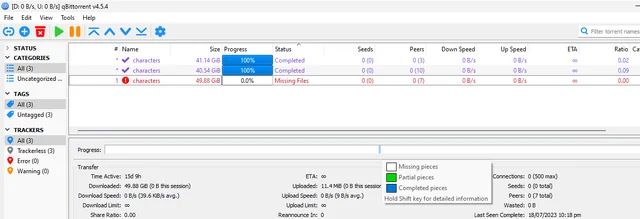
Data Chunking Mechanism and Piece Hashing (Piece Hash)
In BitTorrent v1, the content is divided into fixed-size pieces, except that the final piece may be shorter. The protocol specification notes that the piece length is usually a power of two and historically lists 256 KiB as a common value. It is not restricted to a universal range of 512 KiB to 16 MiB. Each v1 piece has a corresponding SHA-1 hash stored in the torrent metadata.
When a client receives a complete piece, it calculates the piece hash and compares the result with the expected value. A piece that does not match is rejected and must be downloaded again.
BitTorrent v2 works differently. It uses SHA-256 Merkle trees built from 16 KiB blocks to support verification of file content.
These mechanisms detect accidental corruption or data that differs from the torrent definition. They do not determine whether the defined content is legitimate or harmless.
Performing a Manual Data Verification (Force Recheck / Force Check)
If the files are already present:
Open the torrent client.
Confirm that the torrent points to the correct download directory.
Right-click the torrent entry.
Select Force Recheck, Force Check, or the equivalent command.
The client reads the available files and compares their content with the hashes required by the torrent metadata. qBittorrent provides a manual Force Recheck function and also offers an optional recheck after download completion.
A 100% result means the files match that torrent’s expected data. It does not mean an antivirus has inspected the files or that the uploader did not include a harmful executable.
Identifying Signs of Modified or Missing Data Files
Stuck at 99%: This can mean that one or more required pieces are missing or do not match. It can also occur when files were moved, renamed, edited, deleted, selectively excluded, or saved to the wrong directory.
In multi-file torrents, a piece can span the boundary between two files. Excluding one small file may therefore leave part of a selected file appearing incomplete. Reports from qBittorrent users show that partial file selection can result in 99.x% displays after rechecking.
Repeated Hash Failures: A rising amount of discarded data may indicate an unreliable peer, storage problem, memory issue, network corruption, or damaged local file. It does not identify a malicious peer by itself.
If the same verified piece repeatedly becomes invalid after being written, check the storage device, available disk space, file permissions, and system stability.
Signs of Fake Torrent Trackers
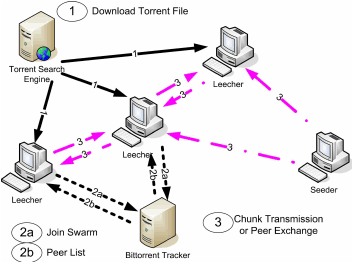
Spotting Synthetic Seeder and Leecher Counts
Seeder counts should not be used as a safety score. A popular torrent can contain harmful files, while a legitimate archive may have very few peers.
Tracker scrape results can report the number of active complete peers, active incomplete peers, and recorded completions. These values describe the tracker’s view of the swarm, not a real-time list of peers that one client is guaranteed to reach.
A tracker may report many seeds while the client connects to none because of stale statistics, network restrictions, tracker update intervals, private-tracker rules, unreachable peers, or differences between tracker, DHT, and peer-exchange data.
A large discrepancy deserves attention, but it does not prove that the numbers were intentionally fabricated.
Inspecting Tracker Lists and Scraping Data
Open the torrent client’s Trackers panel and review each tracker’s address and response.
Do not open links supplied inside unexpected tracker error messages. A tracker should not require an unrelated media player, browser extension, certificate, codec package, or custom torrent client.
Removing or adding trackers usually does not change a v1 infohash because the primary announce field is outside the info dictionary. This is another reason a matching infohash does not prove that two complete .torrent files are identical.
Reviewing Community Ratings and Feedback
Comments can reveal reports of password-protected archives, unexpected executables, missing files, or installation problems. They should be treated as unverified user reports.
Comments can be fake, outdated, copied, deleted, or posted before a threat is discovered. A lack of warnings does not mean a torrent is safe, and a single accusation does not prove that it is malicious.
Safety Steps to Take Before Opening Downloaded Files
Passing a torrent recheck confirms integrity against the supplied torrent metadata. It does not replace source verification, malware screening, file-type inspection, or software-signature validation.
Scan for Viruses and Malware Using Security Software
Update the operating system and security definitions before scanning.
On Windows, right-click a file or folder, select Show more options, and choose Scan with Microsoft Defender. Microsoft documents this process for targeted file and folder scans.
Do not assume that one clean scan guarantees safety. New malware, scripts requiring user interaction, password-protected archives, and carefully targeted threats may not be detected immediately.
Avoid uploading confidential, private, licensed, or personal files to a public scanning service. VirusTotal states that standard scan reports are shared with its community and that submitted file contents may be available to security partners or qualified premium customers.
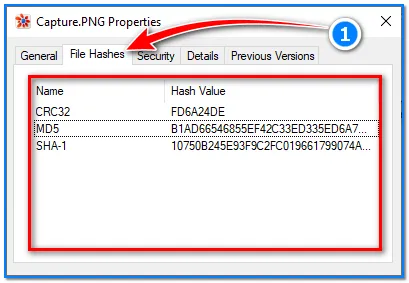
Check Individual File Hashes (MD5 / SHA-256)
A checksum is useful only when it is compared with a value obtained independently from the official publisher or another authoritative source.
On Windows, one available command is:
certutil -hashfile "C:\path\to\file.exe" SHA256
Microsoft documents the -hashfile function, although it notes that Certutil is an administrative tool rather than a supported production programming interface.
Prefer SHA-256 when the publisher provides it. A matching value confirms that the local file is byte-for-byte identical to the file used to create the published checksum. It does not independently prove that the publisher’s file is secure.
Common Risks of Downloading Modified Torrent Files
Malware Threats and Fake Torrent Clients
Trojan and Ransomware Injection: Executables presented as cracks, activators, key generators, patches, or installers carry greater risk because running them grants code an opportunity to alter the system.
Crypto Miners: Unauthorized mining software may consume processor or graphics resources, but high CPU or GPU usage alone is not proof of mining. Games, video encoding, updates, and legitimate background tasks can cause similar symptoms.
Malicious Client Requirements: Treat instructions to install an unfamiliar torrent client, browser extension, codec, certificate, or proprietary player as a serious warning. Obtain software only from its verified developer website or trusted operating-system repository.
Replaced Content and Corrupted Data
File Extension Spoofing: Enable full filename extensions before opening downloads. A filename such as movie.mp4.exe may otherwise appear to be a video.
Codec Scams: Modern media players already support many common formats. A video that directs users to an unrelated website for a “special codec” or player should not be trusted.
Archives containing scripts, shortcuts, executable files, disk images, or password instructions require more caution than ordinary media and document files.
Compare the v1 or v2 infohash with an independent official record when one exists. A match from third-party indexers alone does not establish authenticity. Confirm that the local data matches the hashes in the selected torrent. Treat incomplete results as evidence of missing or different data, not automatic proof of an attack. Run an updated local security scan and compare SHA-256 values with checksums published by the original provider. When no official torrent, signed release, authoritative checksum, or authorized mirror can be found, the file’s origin remains unverified even if every piece passes its torrent hash check. The lowest-risk choice is not to execute it and to obtain the content through a lawful, official source.